From one IOC to a repeatable investigation with MispQL
Search MISP with an SQL-like language, turn investigations into repeatable reports, and see what an open query format could mean for threat intelligence tools.
A teammate sends you a domain as an indicator of compromise (IOC) and asks whether it has shown up in your threat intelligence. You find a few related observations, then the questions get more specific. Which results belong to the same domain family? Which MISP events contain them? How many matching records have changed in the last day? Can the next analyst run the same search?
MispQL lets you write that investigation as a series of readable queries. You can start at an interactive prompt, save the useful statements in a file, and run them again from a shell job or a Python integration. The filters run on the MISP server under the API account’s permissions. The client can shape the reply into a terminal table, selected JSON fields, or CSV, and it can pass through exports generated by MISP. MispQL project
Start with the records you need
MISP searches can answer at different levels. Choose attributes when you need individual observations such as domains, IP addresses, or hashes. Choose events when you need the intelligence packages that provide context for those observations. Other tables let you search objects, event reports, galaxy clusters, tags, organisations, collections, and analyst notes, opinions, and relationships. Each table maps to a MISP API resource and has its own searchable fields. MISP Book query walkthrough
Suppose your team is looking into example.org. This query finds the apex domain and its subdomains among recently modified domain attributes. It keeps the indicator, event ID, and event title together so you can pivot into the underlying event.
SELECT uuid, event_id, value, Event.info, Tag
FROM attributes
WHERE type = 'domain'
  AND (value = 'example.org' OR value LIKE '%.example.org')
  AND timestamp >= '7d'
ORDER BY id DESC
LIMIT 25 FORMAT table;
The parentheses keep the two domain tests together. The suffix pattern starts with a dot, so it finds a name such as login.example.org. The equality condition includes example.org itself. timestamp is the attribute’s last modification time. Use publish_timestamp for event publication or date on the events table for the date recorded on the event. MISP Book on conditions and timestamps
When the question changes to “Which intelligence packages should I review?”, search the events. The book illustrates this with a financial-fraud triage query that selects published events containing a Bitcoin attribute or a bank-account object. Searching at the event level lets you keep context around the matches. Search attributes directly when you need only the matching observations. MISP Book on combining conditions
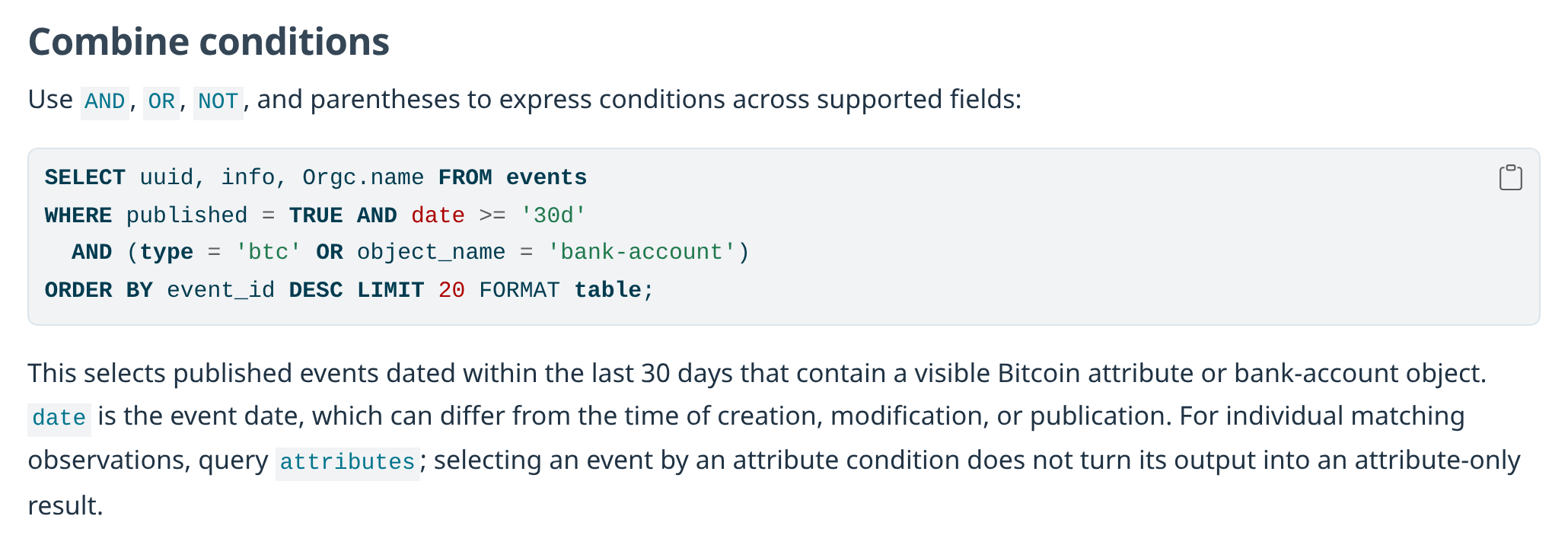 MISP Book, “Combine conditions”
Run your first query
The current client requires Python 3.11 or later. Live queries need a MISP 3.0 instance with complex-query support and an API account that can use it. On MISP, give the automation account the visibility it needs and enable the Complex query role permission. Site administrators already have access. A read-only API key is suitable for search when the role has the required permission. MISP Book setup
git clone https://github.com/MISP/MispQL.git
cd MispQL
python3 -m venv .venv
.venv/bin/python -m pip install .
.venv/bin/mispql --version
Save your connection details in ~/.config/mispql/config.toml. Keep certificate verification enabled. For an internal server, you can set verify_ssl to the path of your organisation’s CA bundle.
[default]
url = "https://misp.example.org"
verify_ssl = true
timeout = 60
Start the prompt with a key file readable only by your account. An interactive session can also prompt for the key.
.venv/bin/mispql \
  --config ~/.config/mispql/config.toml \
  --key-file /run/secrets/mispql-key
WHOAMI;
SHOW TABLES;
DESCRIBE attributes;
WHOAMI tells you which account and instance are active. SHOW TABLES checks which resources are available to that connection. DESCRIBE shows the server’s filter fields, types, permitted operators, and query limits, with the client’s supported sort names. At the interactive prompt, end each statement with a semicolon and use Tab for completion. MISP Book discovery commands
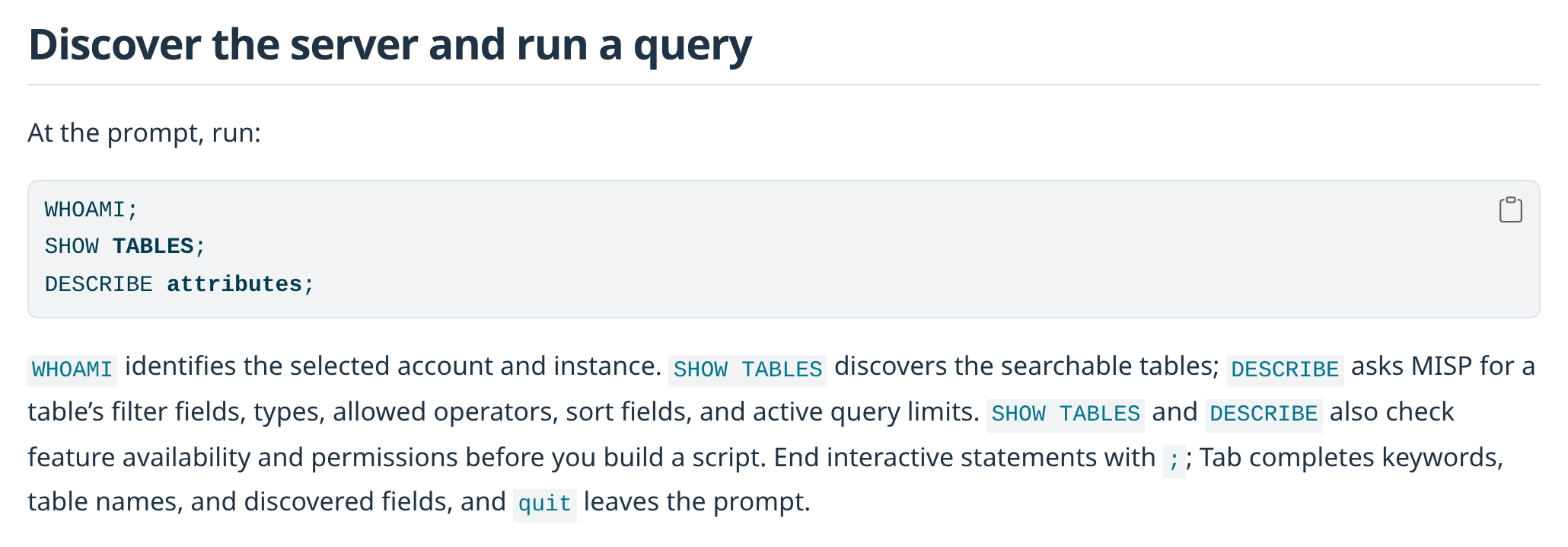 MISP Book, “Discover the server and run a query”
Filter fields and projected columns have different jobs. For example, use eventinfo in an attribute filter and Event.info when selecting the event title as a column. The client checks local syntax before sending a query. MISP checks whether the fields and operators are supported, and the CLI can point back to the condition when the server reports a query error. Before the first filtered search on a connection, the client verifies complex-query support. That check matters because older servers can ignore the filter and return unfiltered results. MISP Book troubleshooting
Turn a useful search into a report
A count is often enough for a dashboard or an analyst’s morning check-in. This one measures how many visible domain attributes were modified in the previous 24 hours. It counts matching attribute records, so the same domain can contribute more than once if it appears in several records.
SELECT COUNT(*) FROM attributes
WHERE type = 'domain' AND timestamp >= '1d';
COUNT(*) requires WHERE and returns a single number. A row query instead lets you choose the shape of the result. Use FORMAT table during an investigation, a column list without FORMAT for a JSON adapter, and FORMAT flat when a downstream tool expects flattened CSV. SELECT * without a format keeps nested JSON. For a native export such as STIX 2, the server builds the export and the client passes it through. Formats depend on the endpoint. MISP Book on counts and pagination
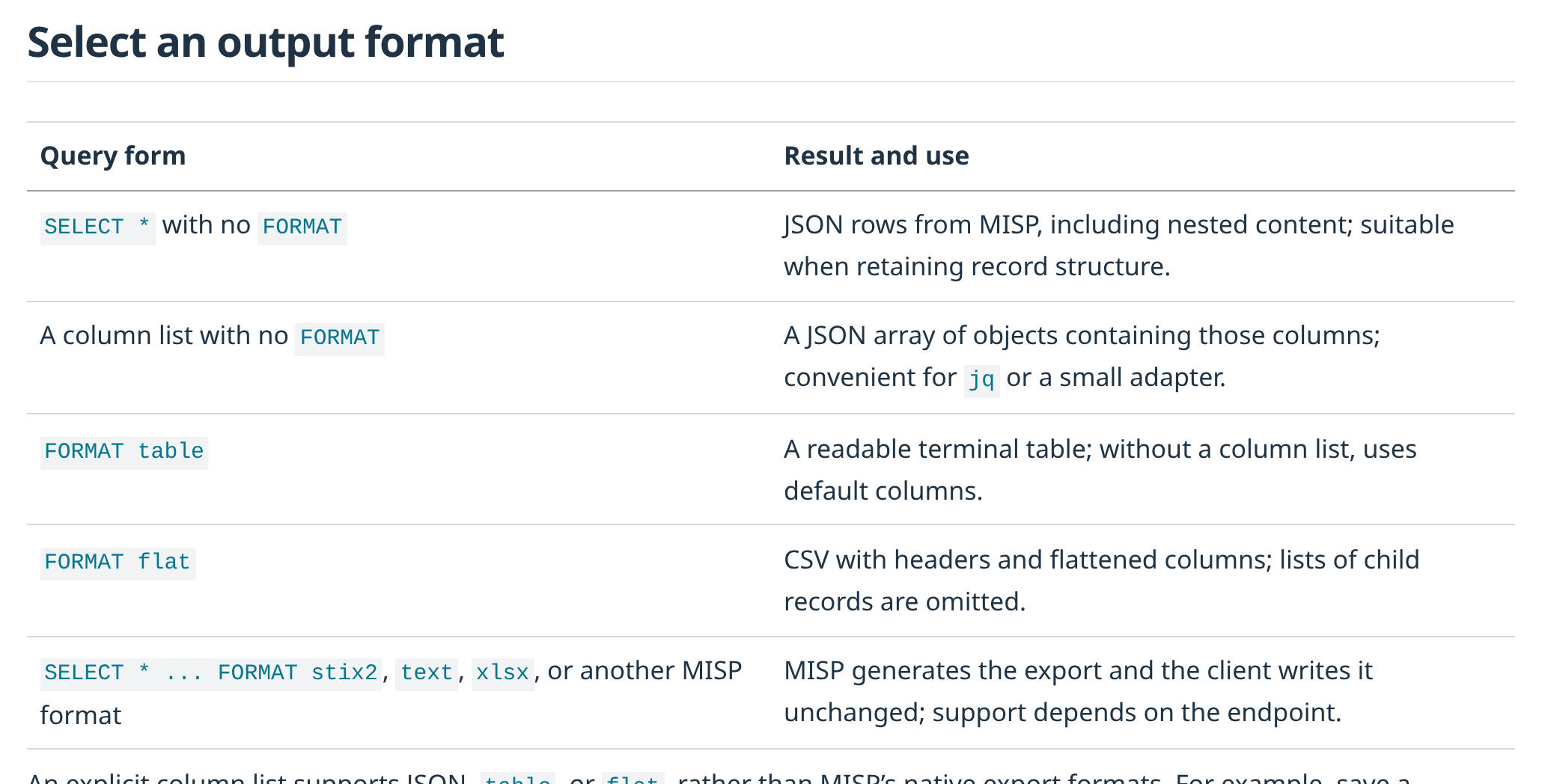 MISP Book, “Select an output format”
For a recurring review, put a single query in recent-domains.mql. Keep the result modest while you establish the reporting window and tune the fields your consumers need.
SELECT uuid, event_id, value, timestamp FROM attributes
WHERE type = 'domain' AND timestamp >= '1d'
ORDER BY id
LIMIT 100;
The CLI can read queries from a file, standard input, or the -e option. For a scheduled report, update the destination only after a successful run. The temporary file in this POSIX shell example is created alongside the destination so the final rename can replace it atomically.
#!/bin/sh
set -eu
umask 077
report=recent-domains.json
tmp=$(mktemp "$report.XXXXXX")
trap 'rm -f "$tmp"' EXIT
trap 'exit 1' HUP INT TERM

.venv/bin/mispql \
  --config "$HOME/.config/mispql/config.toml" \
  --key-file /run/secrets/mispql-key \
  recent-domains.mql > "$tmp"

mv "$tmp" "$report"
If you need every result, page through a fixed time window using a supported, stable sort, such as ORDER BY id on attributes. A relative cutoff can move between requests, and records can change while you page. For a recurring feed, plan for overlap, reconcile by UUID, and handle records that are deleted or cease to be visible. A bounded report and a synchronisation feed have different jobs. For a handoff to another organisation, confirm that the destination is approved for the data even if you used a TLP tag to select the records. MISP Book on repeatable shell jobs
See the request behind the query
Use --dry-run to inspect the request without a server connection or an API key. That makes it easy to review a new query, teach the syntax, or share the exact filter logic with a team that calls the REST API directly.
.venv/bin/mispql --dry-run -e "SELECT uuid, value FROM attributes
  WHERE type = 'domain' AND timestamp >= '7d'
  LIMIT 100;"
The client emits POST /attributes/restSearch and the JSON body. The Boolean tree under query is what MISP evaluates. In this example AND requires both conditions, and the client projects uuid and value from the returned rows. A dry run verifies compilation locally. Use a small live query under the intended account to verify server support and permissions before scheduling it. MISP Book REST walkthrough
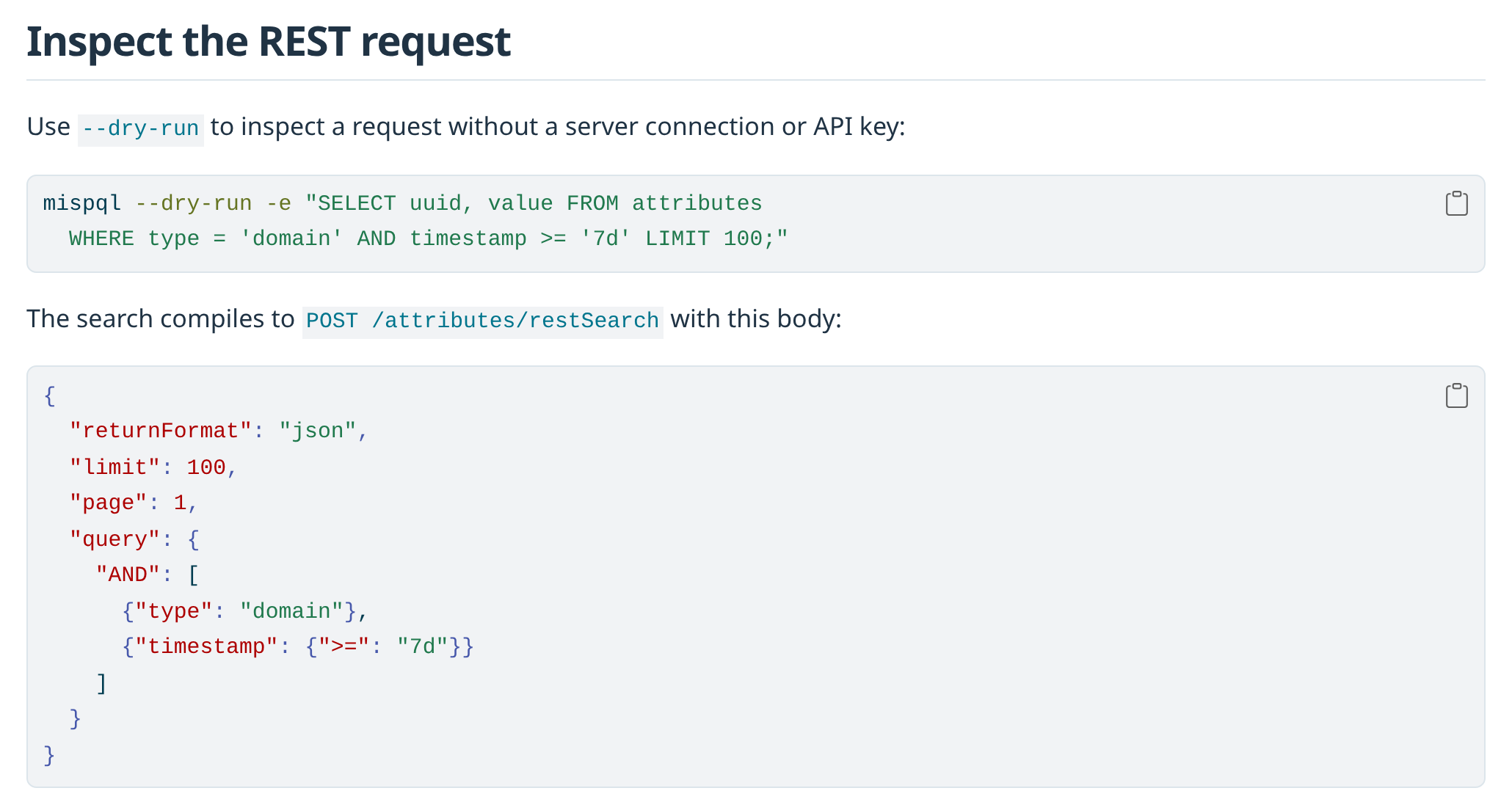 MISP Book, “Inspect the REST request”
If your integration already owns its HTTP session, use the Python library. mispql.compile() produces a request plan and mispql.Exchange manages the requests and interprets replies. Your application controls transport, credentials, timeouts, and TLS. This short example inspects the compiled search body without making any requests.
import json

import mispql

[statement] = mispql.compile(
    "SELECT uuid, value FROM attributes "
    "WHERE type = 'domain' AND timestamp >= '7d' LIMIT 100;"
)

print(json.dumps(statement.plan.body, indent=2))
You can also configure one connection profile per MISP instance or account, run a script with --profile reporting, and check the active account with WHOAMI. For an integration that creates events, updates attributes, or submits sightings, use PyMISP or the MISP REST API for the write operations. MISP Book Python integration
A query language other CTI platforms can implement
On 26 November 2026, we published the first MispQL specification as an Internet-Draft with intended Informational status. In MispQL: A Query Language for Cyber Threat Intelligence, Alexandre Dulaunoy and Andras Iklody describe the text syntax using ABNF, define query semantics and the JSON filter tree, and document the REST binding used by MISP 3.0. The published version is draft-dulaunoy-mispql-00, a proposal open to review and implementation feedback. Published Internet-Draft
For another CTI platform, adopting the syntax is one part of interoperability. A platform also needs to describe its schema profile: which tables and fields it exposes, their types and operators, how related records match, and which sorts and limits apply. Two platforms that expose the same profile can interpret the same query against their respective datasets. One might store indicators in a relational database and another in a search index. Each still applies its own access controls. The draft examples and the MISP binding show which parts can be shared across implementations. Internet-Draft query semantics and examples
The first implementations cover complementary pieces. The MispQL CLI and Python library parse text into request plans. The MISP 3.0_wip server implements the structured complex-query engine. Together they give implementers a concrete path to follow and analysts a language they can start using today wherever complex queries are available. Python implementation · MISP 3.0 complex-query implementation
Try it with a question you already ask
Pick one search your team runs every week. Use DESCRIBE to confirm its fields, run it with a small LIMIT, and inspect the output with the account that will own it. Save the query once it answers the question. The next analyst can read the conditions, change the time window, and rerun the same investigation.
Documentation screenshots are cropped from “MispQL for Querying and Exporting Intelligence” in the MISP User Guide. The screenshots are credited to the MISP Book contributors and reused under CC BY-SA 4.0. MISP Book chapter · CC BY-SA 4.0