




By Koen Van Impe June 8, 2026

Create a daily threat briefing with zsazsa and MISP
Introduction
zsazsa is a small application that supports day-to-day CTI work, including stakeholder management, handling PIRs, GIRs and RFIs, data collection, and the creation of threat intelligence products. No external tooling is required, MISP acts as the back-end storage layer. Events, reports, and the final intelligence products are all stored in MISP. A nice side effect is that those products are not limited to the usual notification channels like Mattermost or Teams; they can also be shared through the standard MISP sharing and distribution model, in the same way as threat events. You can find zsazsa on GitHub: https://github.com/cudeso/zsazsa/.
In the example below, the daily briefing builds on articles collected by MISP scraper (see https://github.com/cudeso/misp-scraper and https://www.misp-project.org/2022/08/08/MISP-scraper.html/).
A daily threat briefing
A daily threat briefing is a short operational intelligence product, put together from a collection stream and refined by an analyst. The goal is not to recap everything that came in during the day, but to highlight what matters, add context to make it useful, and send something to stakeholders where they can act on straight away.
Workflow
Start with today’s queue
Open Data Collection and load the preset for today’s scraper events. This gives you a queue limited to the material collected today from the MISP scraper. To begin with, we will first do a simple cleanup and reject obviously low-value events, then do a quick visual review of the remaining items to remove anything that is unlikely to add value to the briefing. In this case, we also remove articles which are not in English.
Review events, summarise and enrich
Go through the remaining events one by one. Open the report preview and check whether the article is relevant enough to carry forward. If it is, generate an AI summary and flag the event.
At the same time, add context where it is useful, such as geographical scope, sector, and techniques. This is a small step, but it makes later filtering and reporting much more useful.
Add additional context:
Generate AI summary:
Build a new daily briefing
Once the queue has been reviewed, use the filter that shows flagged events only. Select the events and create a new product with Add to daily briefing (new).
This moves you from collection review into product creation without having to rebuild the shortlist manually.
Compose the draft
In Compose daily briefing, reuse the AI summaries created earlier. zsazsa can also generate all story drafts directly from this screen, but in this workflow that is not necessary because the summaries were already produced during review.
For stories where it makes sense, also select the threat actor type. This is useful later when those data points are reused in threat landscape reporting or recurring statistics.
Save the draft when the first version looks right.
Add relevant events from MISP communities
Go back to Data Collection and review events received from your connected MISP communities. If one of those events also belongs in the briefing, select it and add it to the existing draft.
In that case, you can use both the event report and the AI summary created for that event. That gives you a concise story while keeping it grounded in the original material.
Review and distribution
Open the briefing preview and do a final quality check. At this stage you mainly want to confirm that the stories work well together and that the output is ready for the intended audience.
Also review who would receive the briefing with the current distribution settings.
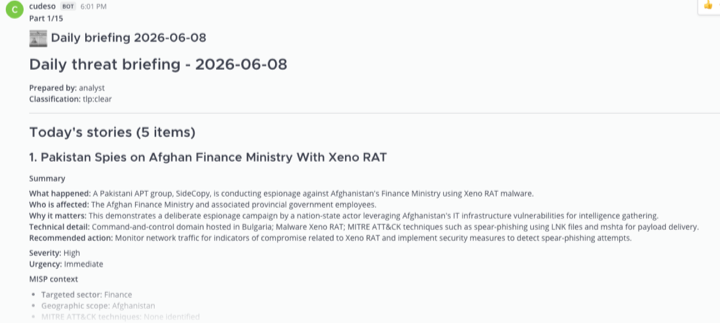
When everything looks good, publish the briefing. From there, you can watch the notification arrive in Mattermost. If needed, you can also export the briefing as PDF and share it through other channels.
End
What makes this workflow worth using is that it fits into how CTI work actually happens day to day. There is no separate editorial system to maintain, no extra place where products drift out of sync with the underlying intelligence, and no weird export step between collection and publication. Everything happens around the same MISP instance you are already using.
Zsazsa is not trying to replace anything in MISP. It sits on top of it and turns the material you already collect into something stakeholders can actually use.